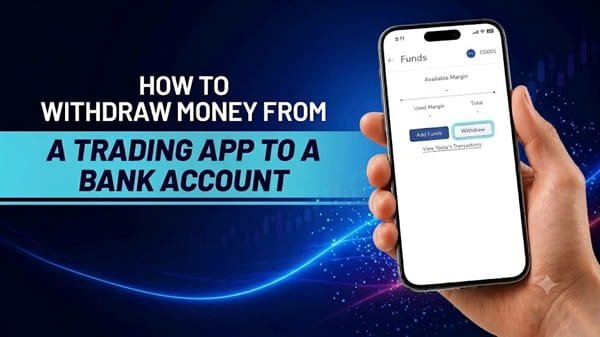
Withdrawing money from a trading app to a bank account is usually straightforward, but the process can confuse new investors. After selling shares or closing a trading position, you may see a balance in your app without being able to transfer the entire amount immediately. This happens because trading apps distinguish between available funds, unsettled sale proceeds, and money that can actually be withdrawn.
In India, the exact withdrawal procedure depends on your stockbroker, the type of transaction, and the applicable settlement rules. Understanding these differences helps you transfer funds safely, avoid unnecessary delays, and prevent mistakes when managing your investment account.
Understand Which Money You Can Withdraw
Before requesting a withdrawal, check the available balance in your trading app. The amount displayed as your total balance may not be the same as the amount eligible for transfer to your bank account.
For example, money received from selling shares may remain unsettled until the relevant settlement process is completed. Under India’s standard T+1 settlement cycle for regular equity trades, settlement generally takes place on the next eligible working day, although specific transaction types can follow different arrangements.
Your broker may also deduct brokerage, statutory charges, taxes, outstanding obligations, or other applicable amounts before calculating the withdrawable balance. Funds required to support open positions or margin requirements may remain unavailable for withdrawal.
Check the app’s funds section for labels such as available balance, withdrawable balance, unsettled funds, or used margin. These terms can vary between brokers, so read the platform’s explanation rather than assuming all displayed money is immediately transferable.
Step-by-Step Process to Withdraw Money
Although the layout differs across trading platforms, the withdrawal process generally follows the same pattern.
Log In to Your Official Trading App
Open your broker’s official mobile application and sign in using your registered credentials. Make sure you have downloaded the genuine application from a recognised app store or the broker’s official website.
Avoid following withdrawal links sent through unsolicited messages. If you are unsure whether an app or website is genuine, verify it through your broker’s official communication channels before entering financial information.
Open the Funds or Account Section
Once logged in, locate the section labelled Funds, Account Balance, Wallet, or Withdraw Funds. The exact wording depends on the broker.
Review the balance shown and confirm how much is available for withdrawal. If you recently sold shares, check whether the proceeds have completed settlement and become eligible for transfer.
Select the Withdrawal Option
Choose the option to withdraw or transfer funds to your registered bank account. Some brokers display both deposit and withdrawal options on the same screen, so select the correct one.
The app may show your available withdrawal amount and any applicable conditions. Enter the amount you wish to transfer, making sure it does not exceed the permitted balance.
If the app displays an amount lower than your total trading balance, review whether unsettled proceeds, margin requirements, or outstanding charges explain the difference.
Confirm Your Registered Bank Account
Most brokers transfer withdrawals to a verified bank account linked to your trading account. Depending on the provider, you may be able to select an existing registered account or need to complete a separate bank-account verification process.
Check the displayed bank details carefully before submitting the request. If your bank account has changed, follow the broker’s official procedure to update and verify the new details. Do not attempt to bypass verification by entering another person’s account information.
Submit and Authenticate the Request
Enter the withdrawal amount and review the details before confirming. The broker may require an OTP, app-based authentication, or another security check.
Approve only requests you initiated yourself. Never share your password, trading PIN, OTP, or other confidential credentials with someone claiming they need them to process a withdrawal.
After submission, the app may display a request reference number or status such as pending, processing, or completed. Save the reference if you need to contact customer support later.
Check Your Bank Account
Monitor the withdrawal status in the trading app and check your bank account for the incoming credit. A completed request on the broker’s side may not always appear instantly in your bank statement.
If the expected amount has not arrived within the broker’s stated processing period, check the request status and any notifications. Contact the broker through its official support channel if the delay continues.
How Long Does a Trading App Withdrawal Take?
Withdrawal time depends on the broker’s processing schedule, the bank’s systems, the availability of settled funds, and when the request is submitted.
Some brokers process eligible requests on the same working day, while others may take longer. Requests submitted outside processing hours, on weekends, or during bank holidays may be handled on the next working day.
If you are withdrawing money from a recent share sale, remember that the proceeds may first need to complete the applicable settlement process. Check your broker’s withdrawal policy for the latest timelines rather than assuming every transfer will arrive immediately.
Why Is Your Withdrawal Request Delayed or Rejected?
A withdrawal may be delayed or rejected for several reasons:
- Insufficient withdrawable balance: Some funds may still be unsettled or reserved for open positions.
- Bank verification issues: Incorrect details or incomplete verification can prevent a transfer.
- Pending obligations: Outstanding charges, margin requirements, or other dues may reduce the amount available.
- Technical or banking delays: Temporary service disruptions can affect processing.
- Account restrictions: Additional verification or compliance checks may be required in certain circumstances.
If a request fails, read the message displayed in your app and contact your broker if necessary. Avoid submitting repeated requests without checking whether the original transaction is still being processed.
Important Safety Tips Before Withdrawing
Use only your broker’s official application or website, and keep your registered mobile number and email address up to date. Enable available security features and review the bank details shown before authorising a transfer.
Be cautious of anyone demanding an additional payment, OTP, or remote access to your device to release your funds. If a withdrawal appears suspicious, contact your broker directly through its verified support channel.
Also, remember that withdrawing money from a trading account is different from withdrawing securities from a Demat account. Cash withdrawals transfer eligible funds to your bank, whereas securities transfers involve shares or other eligible holdings.
Conclusion
Withdrawing money from a trading app involves checking your withdrawable balance, selecting the withdrawal option, confirming your registered bank account, and completing the required authentication. The transfer may take time if the funds are unsettled, verification is incomplete, or banking processes are delayed.
For a smooth experience, follow your broker’s official instructions, verify the transaction details, and keep your withdrawal reference number. Most importantly, distinguish between money shown in your trading account and funds that are actually available for withdrawal. This simple check can help you avoid confusion and manage your investment funds more confidently.
Frequently Asked Questions
Q. Can I withdraw money immediately after selling shares?
Not always. Sale proceeds may need to complete the applicable settlement process before becoming withdrawable. Check the available balance and your broker’s settlement policy.
Q. Is there a minimum withdrawal amount?
The minimum amount, if any, depends on your broker’s rules. Check the withdrawal screen or official support documentation for the applicable limit and charges.
Q. Can I withdraw money to a bank account that is not registered with my broker?
Generally, withdrawals are made to a verified bank account linked to your trading account. You may need to register and verify another account through the broker’s authorised process before using it.
Q. Why is my trading balance higher than my withdrawable balance?
Your displayed balance may include unsettled sale proceeds or funds reserved for margin requirements and outstanding obligations. The withdrawable balance reflects the amount currently eligible for transfer under the broker’s rules.
Q. Are trading app withdrawals subject to charges?
Charges depend on the broker and the type of withdrawal. Review the platform’s current fee schedule before submitting your request.