Finding the right government loan scheme can be confusing. A small entrepreneur may qualify for Mudra, while a farmer may need Kisan Credit Card or Agriculture Infrastructure Fund finance. A homebuyer, street vendor or food-processing business can have completely different eligibility rules. Visiting several banks just to understand which scheme is suitable can make the process even more difficult.
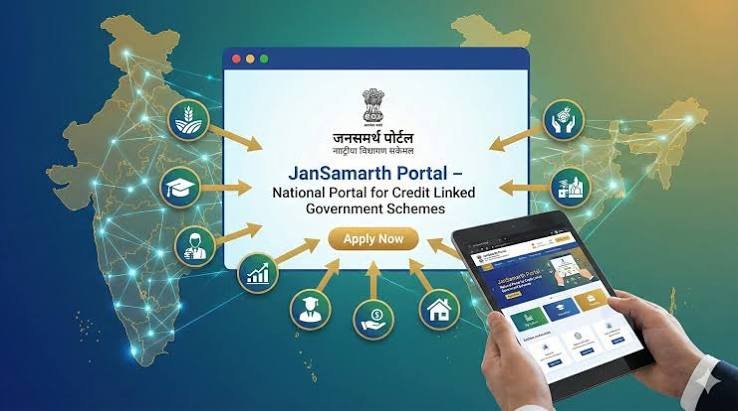
The Jan Samarth Portal was created to simplify this process. It is a Government of India digital platform that brings multiple credit-linked Central Government schemes onto one common system. Instead of starting with a particular bank or trying to identify a scheme independently, an applicant can first answer eligibility questions, see suitable schemes, submit details and documents, compare participating lenders and track the application online.
As of 2026, Jan Samarth hosts 15 credit-linked Central Government schemes covering areas such as business, agriculture, housing, renewable energy, livelihoods, startups and street-vendor finance. Around 254 lenders had been onboarded by March 2026.
What Is the Jan Samarth Portal?
Jan Samarth is the National Portal for Credit-Linked Government Schemes. It was launched on June 6, 2022 by the Government of India.
Its purpose is to connect:
- Loan applicants
- Banks and other lenders
- Government ministries
- Nodal agencies
- Scheme implementing agencies
- Facilitators
on one digital platform.
The portal does not itself lend money. Instead, it helps determine scheme eligibility and connects the applicant with participating financial institutions.
The portal is integrated with several government and financial databases, including Aadhaar, PAN, Udyam, GST, CIBIL, AgriStack and other systems. These integrations allow information to be checked digitally and can reduce repetitive documentation.
Which Loan Schemes Are Available on Jan Samarth?
The exact list can change as schemes are added or modified. The Department of Financial Services listed the following 15 schemes on the portal in 2026:
- Pradhan Mantri Mudra Yojana
- Prime Minister’s Employment Generation Programme
- Agriculture Infrastructure Fund
- Kisan Credit Card
- Kisan Credit Card – Fisheries
- Agri Clinics and Agri Business Centres Scheme
- PM SVANidhi
- Weaver Mudra Scheme
- Home loan scheme for EWS, LIG and MIG in urban areas
- Rooftop Solar Installation Financing
- Loan for Startups
- e-Kisan Upaj Nidhi
- NAMASTE
- Deen Dayal Antyodaya Yojana – National Urban Livelihood Mission
- Credit Guarantee Scheme for Exporters
Some schemes offer the complete loan journey through Jan Samarth, while others may redirect the applicant to the relevant scheme platform for further processing.
Who Can Use the Jan Samarth Portal?
There is no single eligibility condition for Jan Samarth because it is a platform containing different government schemes.
Potential applicants include:
- Farmers
- Small business owners
- New entrepreneurs
- Existing micro enterprises
- Street vendors
- Startups
- FPOs
- Agricultural infrastructure developers
- Fisheries operators
- Weavers
- Urban homebuyers
- Renewable-energy applicants
- Eligible livelihood beneficiaries
Your eligibility is determined according to the conditions of the specific scheme rather than simply by registering on Jan Samarth.
Jan Samarth Portal Loan Application Process Step By Step
Step 1: Visit the Official Jan Samarth Portal
Open the official Jan Samarth website.
Applicants should use only the government portal and avoid websites claiming guaranteed government loans in exchange for upfront fees.
Jan Samarth is available through its website as well as official mobile applications. The platform is available 24 hours a day and supports multiple Indian languages.
Step 2: Choose the Type of Loan You Need
Start by identifying the purpose of finance.
Depending on the current portal interface, loan requirements may relate to areas such as:
- Business
- Agriculture
- Housing
- Livelihood
- Renewable energy
- Startup finance
Do not select a scheme simply because it offers the highest loan amount. The business activity and applicant profile must actually satisfy its rules.
Step 3: Check Eligibility Online
Jan Samarth first asks a series of simple questions.
The questions change according to the type of loan selected. You may be asked about:
- Applicant type
- Business activity
- Annual income
- Social category
- Existing business
- Loan requirement
- Agricultural activity
- Property requirement
- Business registration
- Previous government assistance
Based on these answers, the portal’s eligibility system identifies schemes that may fit the applicant.
The Government describes this as an auto-recommendation process designed to match applicants with suitable credit-linked schemes.
Step 4: Register on the Portal
If you want to proceed, create an applicant account.
You may need to provide:
- Mobile number
- OTP verification
- Name
- Basic personal information
- Email address
- Other identification information
Use your own active mobile number because application updates may be sent to it.
Step 5: Enter Aadhaar, PAN and Other Details
Depending on the scheme, Jan Samarth may obtain or verify information through integrated digital databases.
These can include:
- Aadhaar
- PAN
- Income-tax information
- GST
- Udyam Registration
- CIBIL
- Bank account verification
- AgriStack
- Startup information
The portal’s integrations are designed to reduce manual verification and speed up loan processing.
Make sure your name, date of birth and other information are consistent across Aadhaar, PAN and bank records.
Step 6: Fill the Scheme-Specific Application
Once eligibility is established, complete the application for the selected scheme.
For a business loan, the form may ask for:
- Business name
- Nature of activity
- Business location
- Existing or proposed enterprise
- Project cost
- Loan amount required
- Expected turnover
- Employment details
A farmer applying for KCC will face a different set of questions relating to crops, land or allied agricultural activities.
Similarly, a PMAY applicant will need to provide income, family and property information.
Step 7: Upload Required Documents
Documents vary according to the scheme and lender.
Applicants may commonly need:
- Aadhaar
- PAN
- Photograph
- Address proof
- Bank statements
- Business registration documents
- Udyam Registration
- GST information
- Income documents
- Project report
- Machinery quotations
- Agricultural records
- Property documents
- Category certificate
- Scheme-specific certificates
It is better to prepare clear scanned copies before starting the final application.
Step 8: Enter the Loan Amount and Purpose
Specify how much money is actually required.
For example, a business applicant may need finance for:
- Machinery
- Equipment
- Working capital
- Shop setup
- Commercial vehicle
- Inventory
- Expansion
The amount should be supported by the project requirement.
Requesting the maximum scheme limit without explaining why the business requires that much money can weaken the loan proposal.
Step 9: View Offers From Participating Lenders
One of the useful features of Jan Samarth is the ability to see eligible lender offers.
Government information states that around 254 lenders had been onboarded as of March 20, 2026, including:
- 12 public sector banks
- 20 private sector banks
- 28 Regional Rural Banks
- 173 District Central Cooperative Banks
- 15 NBFCs
- 6 Small Finance Banks
Not every lender participates in every scheme.
Where multiple offers are available, applicants should compare them carefully.
Step 10: Compare Bank Offers
Do not select an offer only because the lender shows the highest sanctioned amount.
Compare:
- Interest rate
- Loan tenure
- EMI or repayment structure
- Processing charges
- Margin requirement
- Moratorium
- Collateral rules
- Branch location
- Working-capital terms
For some schemes, the government fixes a subsidy or interest benefit, while the underlying bank interest rate can still vary.
Step 11: Select the Bank and Branch
After choosing a lender, select the appropriate branch where required.
A nearby branch can be useful because certain loan applications may still require physical verification, documentation or post-sanction formalities.
The portal can forward the digitally processed application to the selected bank branch.
Step 12: Get Digital or In-Principle Approval
Jan Samarth can provide digital or in-principle approval for eligible applications, depending on the scheme and lender.
However, this should not always be treated as the same as final loan disbursement.
The bank can still conduct:
- KYC verification
- CIBIL assessment
- Business verification
- Property verification
- Project appraisal
- Document scrutiny
- Security checks
before completing the final sanction.
Step 13: Complete Bank Verification
Even though much of the journey is digital, some applications may require additional interaction with the bank.
For example, the bank may request:
- Original documents
- Updated bank statements
- Machinery quotation
- Site inspection
- Business proof
- Property documents
- Project-report clarification
Respond quickly if the lender asks for additional information.
Step 14: Track the Application Online
Applicants can monitor the progress of the loan through Jan Samarth.
The portal is designed to keep beneficiaries informed at different stages without requiring repeated visits to the bank.
The Government’s basic Jan Samarth application journey is:
Check eligibility → Apply online → View lender offers/get digital approval → Track application.
Keep the application or reference number safely after submission.
Does Jan Samarth Guarantee Loan Approval?
No.
Jan Samarth helps identify eligible schemes and simplifies the application process, but the final credit decision generally remains with the lender.
A bank may reject the proposal because of:
- Poor CIBIL history
- Existing overdue loans
- Insufficient income
- Weak repayment capacity
- Incomplete documents
- Ineligible business activity
- Unrealistic project cost
- Incorrect information
- Failure to meet scheme conditions
Being eligible for a government scheme and being creditworthy for a particular loan are related but separate issues.
Does Jan Samarth Give Government Subsidy?
Jan Samarth itself does not provide one common subsidy.
The benefit depends entirely on the underlying government scheme.
For example:
- PMEGP can provide margin-money subsidy.
- Agriculture Infrastructure Fund can provide interest subvention.
- PMAY-U 2.0 provides eligible housing-loan interest subsidy.
- Mudra primarily provides access to collateral-free business credit and does not automatically provide a capital subsidy.
- KCC can carry eligible interest-subvention benefits.
Always read the rules of the individual scheme before assuming that the loan includes a government grant.
Is Jan Samarth Loan Application Free?
Applicants should not need to pay a private agent merely to check scheme eligibility on the government portal.
However, the underlying loan may involve legitimate lender-related expenses depending on the scheme, such as:
- Processing charges
- Legal expenses
- Valuation fees
- Insurance
- Documentation charges
Some government schemes waive or reduce particular charges.
Never transfer money to an unknown person claiming they can guarantee sanction through Jan Samarth.
How Large Is the Jan Samarth Platform?
The portal has become a significant government credit-delivery channel.
According to Ministry of Finance data, as of March 20, 2026:
- About 14 lakh applications had been processed.
- The applications represented around ₹1,06,306 crore.
- Banks had accorded digital approval to around 07 lakh beneficiaries.
- Digitally approved loans represented about ₹84,365.55 crore.
These figures cover the different government schemes available through the platform rather than one single Jan Samarth loan product.
How To Improve Your Chances of Loan Approval
Before applying:
- Check your CIBIL report.
- Clear avoidable overdue loans.
- Keep Aadhaar and PAN information consistent.
- Prepare a realistic project report for business finance.
- Maintain regular bank transactions.
- Keep required margin money ready.
- Upload complete documents.
- Choose the correct scheme.
- Apply for a realistic loan amount.
- Respond promptly to bank queries.
For business schemes, the applicant should be able to clearly explain how the enterprise will generate enough income to repay the loan.
Jan Samarth Portal Grievance Facility
Jan Samarth also provides a grievance-redressal mechanism.
Complaints submitted through the portal can be recorded and tracked, with responsibilities assigned for handling and resolution. This can be useful when an applicant faces a technical issue or a problem in the loan journey.
Conclusion
Jan Samarth makes it easier to discover and apply for several government-linked loan schemes from one platform. Applicants should first check eligibility, submit accurate documents, compare lender offers and remember that final sanction still depends on the selected bank’s credit assessment.